SEO
SEO
 Web Design & Development
 Google Ads
 Social Media Ads
 App Design & Development
 Lawyer
 Tradies
 E-commerce



 August 14, 2026
Running a successful Google Ads account means dealing with an overwhelming amount of data, from multiple campaigns, ad groups to hundreds of keywords. So, trying to find meaningful insights can feel like looking for a needle in a haystack. This is where Google Ads filters become an essential tool for digital marketers.
Are you managing a small local business account or a massive enterprise strategy? You’ve come to the right article as we’ll explore ways to use Google Ads Filters effectively.
What Are Google Ads Filters?
Google Ads filters are built-in tools that allow you to display only the specific data that matches predetermined conditions. Instead of viewing your entire account at a glance, you can isolate relevant data across:
- Campaigns and Ad Groups
- Keywords and Search Terms
- Individual Ads and Assets
- Audiences and Demographics
For example, manually scanning hundreds of rows to find underperforming keywords sound like a task that’s worth so many hours right?
With a filter, it can instantly highlight only the keywords that have spent over your target threshold but generated zero conversions. It also creates a repeatable and consistent way to identify issues or opportunities without getting lost in the numbers.
The Key Benefits of Filtering Your Data
Using filters can help directly impact how effectively you manage your budget.
Saves Time on Routine Audits
Instead of manually exporting data to spreadsheets to sort and find anomalies, filters allow you to do the heavy lifting directly within the Google Ads interface.
Prevents Wasted Ad Spend
Filter for campaigns or keywords that have high costs but zero (or very low) conversions. This instantly highlights areas where your budget is draining without delivering a return, allowing you to pause or adjust them quickly.
Highlights Scaling Opportunities
Filters are equally powerful for finding your top performers so you can allocate more budget to the ads that are actually working. Once isolated, you can analyse their search terms, ad copy, and landing pages to replicate that success in other areas.
Diagnose Ad Relevance
Filter your keyword list for lower Quality Scores. This is a simple way to spot keywords that suffer from a mismatch between the user’s search intent, your ad copy, and the landing page experience.
Review Ad Engagement
Isolate ads that receive a high number of impressions but have a below-average Click-Through Rate (CTR). This helps you quickly identify weak headlines or messaging that need to be rewritten to attract more clicks.
How to Create, Combine, and Save Custom Filters
The exact interface occasionally changes with Google updates, but the core process remains straightforward:
- Navigate to the section you want to analyse (e.g., Campaigns).

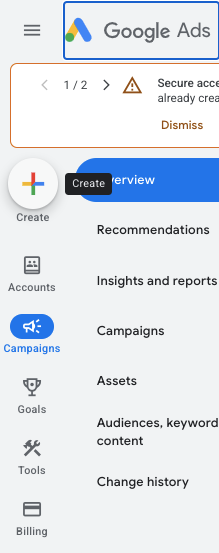
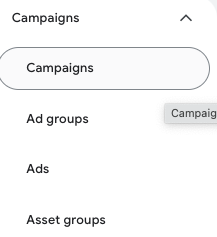
- Click the Add Filter icon above the data table.

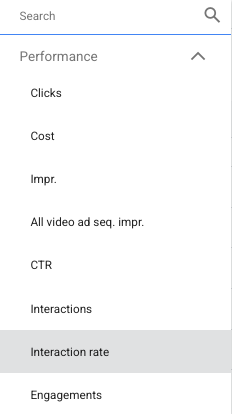
- Choose the filter you want. The real power of filtering lies in layering conditions. You don’t have to stop at one metric. You can narrow down your list by combining criteria, such as: [Spend: > $500] + [Conversions: < 2] + [Time Period: Last 30 Days].
Frequently Asked Questions
What are Google Ads filters used for?
Google Ads filters help narrow down account data based on specific conditions. They make it easier to find campaigns, keywords, ads or other elements that match the criteria you’re investigating.
Can you use multiple filters in Google Ads?
Yes. Multiple conditions can be combined to create a more specific view of your account data. This is useful when you’re looking for a particular performance pattern rather than simply sorting by one metric.
What are the best Google Ads filters?
There isn’t one best filter for every account. Useful filters often relate to spend, conversions, conversion rate, CTR, campaign status and other performance metrics relevant to the campaign’s goals.
Do Google Ads filters change your campaigns?
No. Applying a filter changes the data you see in your account; it doesn’t automatically change the campaigns, ads or keywords themselves.
Conclusion
Google Ads filters are a simple feature, but they can make a significant difference when you’re managing a large amount of campaign data. The key is to use them as a starting point for analysis rather than relying on a single metric to make decisions.
At Ostenpowers, we use data to help businesses understand what’s happening across their digital marketing activity and identify opportunities for improvement.
Want to stop guessing and start scaling your business?
Get in touch with us today to discuss your Google Ads strategy and discover how your campaigns can be managed more effectively.